


On this page
- Is There an Official Tower Rush 2 App?
- How to Download Tower Rush 2 on Android (APK)
- How to Get Tower Rush 2 on iPhone & iPad
- Play Tower Rush 2 Without Downloading
- App vs Browser: Which Is Better for Tower Rush 2?
- Device Requirements & Performance
- Is the Tower Rush 2 APK Safe? Fake Apps and Clones
- What Tower Rush 2 Feels Like on a Phone
- Download Not Working? Quick Fixes
- Get Started with Tower Rush 2 on Mobile
- Frequently Asked Questions About the Tower Rush 2 App
Below are both safe paths, step by step: the casino APK route for Android, the home-screen app route for iPhone, and the zero-download browser option I use myself. I've played Tower Rush 2 on both an Android phone and an iPhone, so the notes here come from actual taps, not theory.
Tested by Michael Hill · Last checked: 8 November 2026
- Standalone app
- No
- Android
- casino APK or browser
- iPhone
- browser / home-screen app
- Price
- free
- Last checked
- 8 Nov 2026
Is There an Official Tower Rush 2 App?
No — Galaxsys hasn't released a standalone Tower Rush 2 app. The game runs inside licensed online casinos, either in their mobile app or in your phone's browser. Anything offering a separate "Tower Rush 2 official app" download is not the Galaxsys game.
Why it works this way: Galaxsys is a game studio, not a casino. It supplies games to operators (a B2B model) and doesn't distribute anything to players directly — no app, no APK, no "game file". So when people search for the "tower rush 2 official app" or "original app", what they actually need is a casino that carries the genuine Galaxsys game. How to verify you've got the original: Original vs Clones.
Official Tower Rush 2 app — doesn't exist. Official ways to play — casino app or mobile browser.
How to Download Tower Rush 2 on Android (APK)
On Android, the full-app route means installing the casino's app — there's no Tower Rush 2 APK on its own. I'll use 1win, the casino where I personally play and where I've confirmed the game in the lobby as of 7 November 2026. One honesty note: I play in the browser myself, so treat this as the standard casino-app flow rather than my personal habit — the game inside is the same either way.
- Open the official 1win site in Chrome on your phone — use our link below to land on the right domain.
- Find the Android app button (usually "Android app" / an APK icon in the header or footer).
- Download the APK from the casino's own site only. (File size and current version are shown on the casino's download page.)
- Allow "Install unknown apps" — for your browser only, and switch the permission back off after installing.
- Install and sign in — or register; it takes about two minutes.
- Find the game: Casino section → search "Tower Rush 2" → tap to launch.
About "apk latest version" searches: the casino's own site always serves the current build, so downloading there is how you get the latest version — not from APK archive sites.
How to Get Tower Rush 2 on iPhone & iPad
APK files don't exist on iOS, so the iPhone route is simpler — and it's the one I've used myself. Depending on your country, the casino's app may be available in the App Store; casino-app availability varies by region and the operator's licensing, so check your local App Store for the casino's name. If searching "Tower Rush 2" in the App Store surfaces "Tower Rush 2D" — that's a tower-defense game by a different developer, not ours.
The option that works everywhere is the home-screen web app. I tested the Galaxsys demo this way on my iPhone, and it behaves like a real app:
- Open Safari and go to the casino site (or the official demo page).
- Tap Share → Add to Home Screen.
- Confirm — an icon appears on your home screen.
- Launch from the icon: the game opens full-screen, without browser bars.
Play Tower Rush 2 Without Downloading
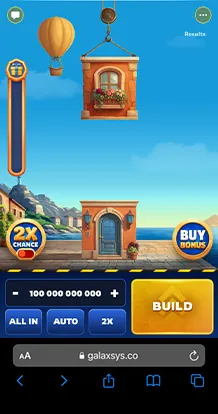
If you'd rather not install anything — or don't want to touch the "unknown sources" permission at all — the browser route is complete, not a compromise. Tower Rush 2 is an HTML5 game: the browser version is the same Galaxsys client with the same 97% RTP and every feature — Bonus Buy, 50% Cashout, Rebuy, Autoplay — not a stripped-down mobile edition.
This is how I play on my phone: Chrome on my Android or Safari on the iPhone, straight into the casino lobby, plus a home-screen shortcut so it opens like an app. You can also try the game with zero registration first — the free demo runs in any mobile browser: Tower Rush 2 Demo.
No install needed: the browser version is the full game — same client, same RTP, same features.
App vs Browser: Which Is Better for Tower Rush 2?
Both run the identical game, so the choice is about convenience, not content:
| Criterion | Casino app (Android APK) | Browser / home-screen shortcut |
|---|---|---|
| Installation | APK download + "unknown apps" permission | None (optional shortcut) |
| Phone storage | Takes space for the app | Practically none |
| Login speed | Stays signed in, one-tap entry | One-tap from shortcut; may re-login more often |
| Notifications | Push notifications available | None |
| Updates | Casino pushes new builds | Always current — the game loads fresh |
| iOS availability | Only if the casino app is in your App Store | Works on any iPhone/iPad via Safari |
My recommendation: on Android, install the casino app if you play regularly; for occasional sessions — or on any iPhone — the browser plus a home-screen shortcut is all you need. One thing the app does not do, despite what some reviews claim: it doesn't make withdrawals faster. Payout speed depends on the casino's processing, not the icon you tap.
Device Requirements & Performance
Exact requirements for the 1win app — minimum Android version and file size — are listed on the casino's download page; I'll quote numbers only once I've verified them on my own device. What I can speak to is how the game itself runs, because that's what I tested:
- Android: smooth animations and no lag on my mid-range phone; battery drain is moderate, typical for a canvas game.
- iPhone/iPad: the browser version (Safari) ran cleanly, including in full-screen from a home-screen icon.
- Connection: on unstable 4G the round simply waits for the network — your drop isn't lost mid-round. One real quirk: in the demo, a backgrounded tab goes to sleep and Autoplay stalls until you return to it.
If your connection drops during a real-money round, don't panic and don't re-bet blindly: open the casino's round history and check how the round settled first.
Is the Tower Rush 2 APK Safe? Fake Apps and Clones
The safe rule fits in one sentence: the only safe Tower Rush 2 download is a casino app from that casino's official website. Everything else using the game's name is something else entirely. Searching the name, you'll meet three categories:
- Same-name store apps. "Tower Rush 2D" (App Store) is a tower-defense game by Baris Percin; "Tower Rush" by Solar Forge Games is a PvP tower-defense game. Legitimate apps — just completely different games, nothing to do with Galaxsys.
- Third-party APK archives. "Tower Rush 2" listings on APK-aggregation sites or file-sharing pages (you'll see names like apkcombo or itch.io uploads) come from unverifiable sources. No one has checked what's inside.
- "Earn money" APKs. Straight scam: the ones I've opened were ad shells or unrelated games, and a sideloaded "earning" app is a direct risk to your card data. The full breakdown: Real or Fake.
No standalone Tower Rush 2 app exists. Any 'Tower Rush 2 APK' outside a licensed casino's site is fake — including every 'earn money' version.
Safe download checklist:
- ✓ You're on the casino's official domain, over HTTPS
- ✓ The file comes from that site's own app page — not an archive site
- ✓ Google Play Protect raises no warning on install
- ✓ The app asks for no unusual permissions (contacts, SMS)
- ✓ After install, casino login works and Tower Rush 2 is searchable in the lobby
What Tower Rush 2 Feels Like on a Phone
The sequel is comfortable on a small screen: the layout is vertical, the tower sits in the middle, and BUILD / CASHOUT are thumb-sized buttons at the bottom. The Progress Bar on the left stays readable, and the important tools survive the shrink just fine — the green 50% button appears next to CASHOUT from x3, and the Rebuy offer pops up as a clear overlay with its ~10-second timer. If you don't know what those do yet, read the mechanics first: How to Play Tower Rush 2.
Two mobile-specific tips from my own sessions. First, decide your Rebuy policy before you play — ten seconds on a phone screen is no time to do math. Second, set your session limit in the casino before the first round: on a phone, "just one more round" is always one thumb-tap away. Rules and my full cashout plan: How to Play.
Download Not Working? Quick Fixes
The problems below cover almost every failed install or launch I've seen reported — and the fixes are usually two minutes each:
| Problem | Fix |
|---|---|
| Installation blocked | Enable "Install unknown apps" for your browser only — and disable it again afterwards |
| "App not installed" / parse error | Delete the file and re-download from the casino's official site; check your Android version and free storage |
| Game won't load in the app | Update the app, switch between Wi-Fi and mobile data, clear the app cache |
| Game missing from the lobby | Game availability varies by country and casino — confirm the operator carries Galaxsys games |
| Site won't open at all | Access rules differ by country — play only where online gambling is legal for you; I don't recommend workarounds |
If none of this helps, the casino's live support is the right next step — they can see your account and region, I can't.
Get Started with Tower Rush 2 on Mobile
The shortest safe path: get the casino app (or just open the browser), try the free demo to feel the below-x1 floors without paying for the lesson, then read the full review before your first deposit. 18+ only.
Frequently Asked Questions About the Tower Rush 2 App
Is there an official Tower Rush 2 app?
No. Galaxsys has not released a standalone Tower Rush 2 app — the HTML5 game runs inside licensed casinos, either in the casino's mobile app or in your phone's browser. Any separate "Tower Rush 2 official app" offered for download is not the Galaxsys game.
Where can I download the Tower Rush 2 APK safely?
There is no Tower Rush 2 APK of its own. What you download on Android is the casino's app — and only from that casino's official website, never from APK archive sites. I play at 1win, where the game is confirmed in the lobby: details above.
Can I play Tower Rush 2 on iPhone?
Yes. APKs don't exist on iOS, so you either install the casino's app from the App Store (availability depends on your country) or play in Safari — adding a home-screen icon via Share → Add to Home Screen makes it work like an app. Full steps: iPhone guide.
Does Tower Rush 2 need a download before I can play?
No. Tower Rush 2 is an HTML5 game — the browser version is the full game with the same 97% RTP and every feature. You can even try it with no registration in the free demo, on any phone.
Is the Tower Rush 2 app free?
There's no paid app: the casino app is free to install, and browser play costs nothing. The game itself is real-money gambling — you deposit to play for money, and the demo is free. 18+, and only where online gambling is legal for you.
Crash games carry real financial risk: stake spare cash only, check your local gambling law first, and stay 18+. Some sign-up links on this page pay us a referral fee — that fee never buys a better verdict. Responsible Gaming.